AthleteMonitoring offers automatic weight assignment for each exercise, based on individual 1RM. When an exercise is prescribed as % of 1RM, AthleteMonitoring uses the latest 1RM calculated during a training session, to automatically calculate and display the prescribed lifting weight (in lb or kg) on the athlete’s app.
Exercise Settings
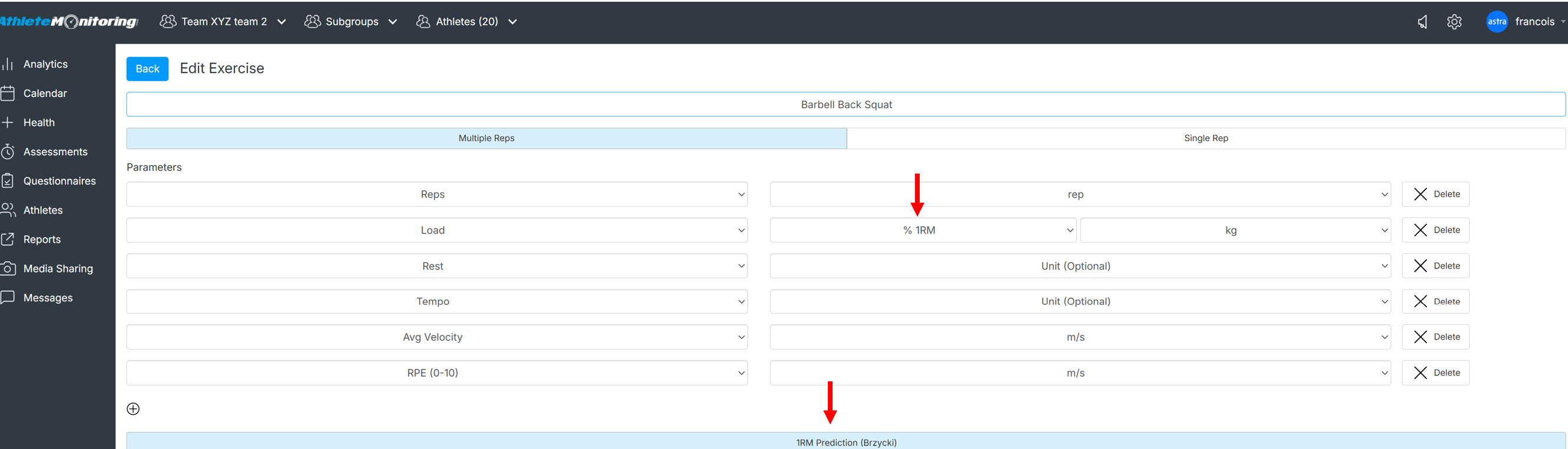
- Open Global Settings-Exercise-Exercise library and open the exercise of your choice.
- Select % of 1RM as the Planned unit and the unit of your choice for the reported unit (usually kg or lb)
- Select the 1RM prediction button
Workout Programming View (coach)
Enter the desired % of 1RM during the session planning process

Workout Recording View (athlete)
Athlete will see the load associated the desired % of 1RM and will be able to report the actual weight used during the lifts

Was this article helpful?
That’s Great!
Thank you for your feedback
Sorry! We couldn't be helpful
Thank you for your feedback
Feedback sent
We appreciate your effort and will try to fix the article