AthleteMonitoring allows you to use the injury and illness diagnostic coding system recommended by the International Olympic Committee consensus statement: methods for recording and reporting of epidemiological data on injury and illness in sport 2020 : the Sport Medicine Diagnostic Coding System (SMDCS) and the Orchard Sports Injury and Illness Classification System (OSIICS).
Selecting the diagnosis system
To change the diagnosis coding system used by the system (default SMDCS), open Global Settings-Health-Diagnostic coding system.
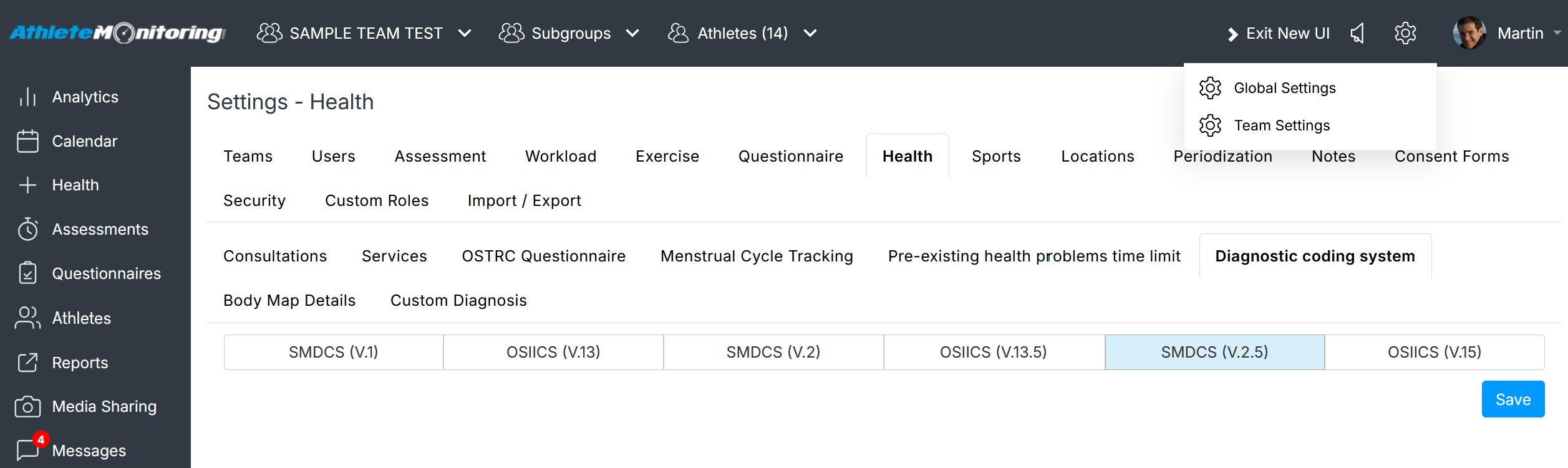
If you wish to change the default diagnosis coding system, make sure to do it before you record any injury or illness, to avoid potential diagnosis and statistical errors.
Example 1: SMDCS coding of a knee injury

Example 2: OSIICS coding of a knee injury

Exporting diagnosis codes
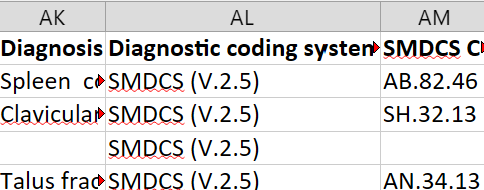
Once an health problem is recorded and diagnosed, it is possible to export a complete log that includes raw data, diagnosis codes, and more.
Simply click the Report menu, open the Health tab and select Injury log or Injury surveillance (if you are using the OSTRC questionnaire) and run the report for the athletes and date range of your choice.
The exported file will include SMDCS and/or OSIICS codes.
Read more
https://bjsm.bmj.com/content/54/7/372
Was this article helpful?
That’s Great!
Thank you for your feedback
Sorry! We couldn't be helpful
Thank you for your feedback
Feedback sent
We appreciate your effort and will try to fix the article